

The algorithm rewards speed.
When you talk to most agencies today about building a website, there is a high chance they will offer you WordPress. This is not surprising. WordPress powers a huge part of the internet today, and its popularity creates the illusion that it is the only and best choice for everyone. However, in the world of digital business, popularity does not always mean quality for modern business needs.
Many entrepreneurs and small business owners do not know that the technology under the hood directly affects whether customers will even find them on Google and, more importantly, whether they will stay on the page long enough to send an inquiry or request a quote. Your website is your best digital employee. If that employee is slow, confused, and insecure, you are losing money.
While WordPress is a great tool for hobby bloggers or quick DIY projects, for serious companies that want speed and real conversions, a custom-developed architecture based on the Next.js framework represents a monumental advantage over traditional platforms. In 2026, search engine algorithms like Google's do not forgive slowness, and users have no patience. In this detailed guide, we will go through all the key differences so you can make the best decision for the growth of your business.
Architecture: Outdated monolith vs modern speed
To understand why the difference in performance is so drastic, we do not need to go too deep into programming. It is enough to look at how these two platforms actually work and how they deliver content to your client.
WordPress as a heavy monolithic system
WordPress is built as a so-called monolith. This means it merges the database, business logic, and the design (theme) itself into one massive, inseparable body. Every time a potential client clicks on your link on their mobile phone, the WordPress server has to do a ton of work in the background. It must search the database, extract text, find images, combine all of this with the design, and only then send it to the user. The result? An outdated and heavy infrastructure that slows down loading. Each of these steps takes time, and in the digital world, milliseconds mean the difference between a sale and a bounce.
Next.js and modern decoupled architecture
On the other hand, using a custom-developed architecture based on the Next.js framework changes the rules of the game. Next.js uses an approach where the front end of the page (what the user sees) and the back end (the database) are completely separated. Next.js uses advanced methods like Static Site Generation (SSG). What does this mean for you in practice? It means that the HTML code of your website is pre-assembled in the background, even before the user clicks on your link. When a client visits your domain, the page is served to them instantly, like a ready-made digital flyer. There is no waiting, no complicated database loading at that moment - the client gets the information immediately.
This technical detail might sound dry, but in real business, it solves one of the biggest problems: page abandonment due to slow loading times.
Why WordPress often becomes a financial money pit
One of the biggest myths is that WordPress is free or extremely cheap. Although the core code itself is free, maintaining a functional business website on this platform often turns into a nightmare for small business owners.
For WordPress to offer advanced features that modern business requires - like contact forms, search engine optimization, fast image loading, or multilingual support - it usually needs dozens of external plugins. Each of these plugins was developed by a different company or developer.
What happens when you have 20 different plugins on your site?
- Code conflicts: Plugins are often not compatible with each other. You update one, and another stops working, which leads to the entire site crashing.
- Hidden costs: Most high-quality plugins today operate on an annual subscription basis. Your "cheap" website suddenly requires hundreds of euros a year just to maintain basic functionalities.
- Loss of time: Instead of focusing on your business and clients, you or your agency spend hours solving technical problems, patching holes, and restoring backups.
Custom development in Next.js eliminates this problem. You get exactly what you need, programmed specifically for your business, without unnecessary code that chokes the system.
Loading speed and "Core Web Vitals" (Google's Holy Grail)
Speed is no longer just a nice addition or a matter of prestige - it is an absolute prerequisite for success. Google algorithms today treat performance and user experience as a direct ranking factor, through metrics unified under the name Core Web Vitals.
These metrics measure how fast the largest element on the screen loads, how quickly the page responds to the first click, and whether there is an irritating shift in content while the page loads (Cumulative Layout Shift).
The problem with WordPress and Core Web Vitals metrics
Due to its heavy architecture and reliance on external plugins, WordPress sites regularly fail these tests. To speed up WordPress, you need expensive servers and complex caching plugins, and even then the results often vary. In the long run, the outdated WordPress infrastructure damages Core Web Vitals metrics.
How Next.js solves the problem at the system level
The Next.js architecture provides the theoretical possibility of achieving perfect metrics in the context of core web vitals, which directly correlates with improved user experience and preferential treatment by Google search engines.
This framework offers specific components designed exclusively to solve these problems. For example:
- Image optimization: Next.js uses a built-in component that automatically ensures images are served in modern formats, adapts the resolution to your user's screen size, and loads only the images that are currently on the screen.
- Font and text stability: To eliminate content layout shifts on the screen, Next.js offers a module that ensures all custom fonts are downloaded and optimized at the time the application is built. There is no ugly font jumping that you often see on slow websites.
When your website has perfect technical scores, Google rewards you with higher rankings, and clients reward you with trust.
Content Management: Sanity CMS and the "Live" editing revolution
Many business owners are afraid of switching to custom solutions because they think they will lose control over their content. They are used to the WordPress interface and are afraid that they will have to pay a developer for every comma or image change. This is another myth we must bust.
In the modern Next.js ecosystem, we use advanced "headless" content management systems, and the absolute leader in this field is Sanity CMS.
Forget about complicated WordPress dashboards, looking for the right menu among hundreds of options, and guessing what your post will actually look like when you publish it. Sanity CMS enables an incomparably easier and more intuitive experience that we call "Live editing" (Visual Editing).
What exactly does this look like in practice?
Instead of working in a separate, dark interface, Sanity allows you to edit content directly on the page itself. You simply click on the element you want to change - whether it is the title of your service, a price on your price list, or a description of your latest project - and type in the new content.
You see the changes in real time, exactly as your clients will see them. If you want to replace a picture of your team, you just click on the old picture, upload a new one, and the job is done. There is no learning complicated tools, no fear that you will accidentally "break" the page design. Your code and design are protected, and you have complete freedom to change texts and visuals at the speed of light.
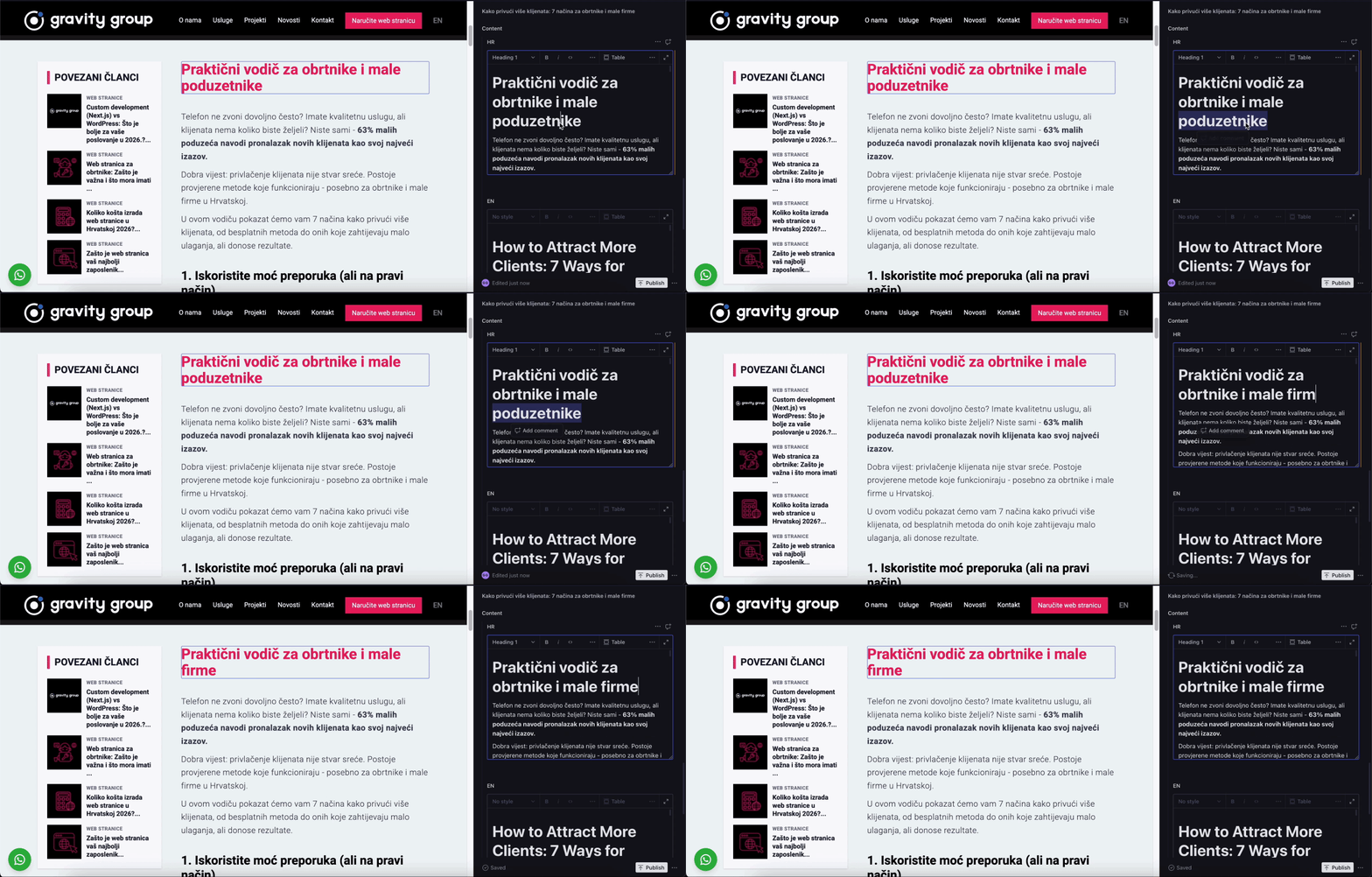
This approach means that you, as the owner of a company or small business, have complete control over your digital assets, without the frustrations that regularly accompany working in outdated CMS systems.
SEO in 2026: How does Google actually see you?
It is not enough to just write good text and insert keywords. Search engines must have uninterrupted access to a fully formed HTML document and its meaning within milliseconds of making a request.
WordPress limitations for SEO
In WordPress, you are often left at the mercy of plugins (like Yoast SEO or RankMath). Although they do a decent job, they work within the limits of WordPress itself. It often happens that due to the slowness of the database, the Google bot leaves your page before it manages to read all the important information.
Next.js dominance in searches
Next.js solves SEO in a completely different, in-depth way. The entire public architecture (all your services, location pages, case studies, and blog) is configured using Static Site Generation (SSG) or Incremental Static Regeneration (ISR).
For you, this means the following:
- Hybrid approach (ISR): Your portfolio pages, blogs, and local pages remain ultrafast as if they were static, but they automatically refresh in the background as soon as you add a new case study or a new text via Sanity CMS. You get SEO freshness without losing speed.
- Dynamic metadata management: In Next.js 15+ versions, all key metadata (titles, descriptions, social media links) are written into the code itself before it leaves the server. This ensures proper interpretation by search engines. Titles and descriptions are generated dynamically and flawlessly, directly encouraging clicks from Google.
The Googlebot currently receives a clean, structured document for Next.js pages. This maximally optimizes the crawl budget and allows you to progress much faster in search results compared to the competition.
System security: Vulnerability vs resilience
When your website is your main tool for client acquisition, you cannot afford a situation where you wake up in the morning and see that the site has been hacked or is unavailable.
Why is WordPress so vulnerable?
Precisely because of its massive prevalence, WordPress is the most common target of automated hacker attacks on the internet. Hackers do not attack you personally; they write scripts that crawl the internet looking for WordPress sites with outdated plugins. As soon as they find a vulnerable plugin, they take control. The result is spam links on your page, stolen client data, and a drop in your brand's reputation.
Security of a decoupled architecture
Next.js drastically reduces the surface area for hacker attacks. Given that it serves only pre-generated, static code to the user (and potential attacker), your main database and management system (Sanity CMS) are not directly publicly exposed in the same place at all. Even if someone tries to breach the front end of the site, there is simply no database there to compromise. Your digital assets are many times more secure.
Price and financial viability: A long-term investment in growth
The most common argument against custom development has always been the price. In the past, you had to hire a team of developers and pay tens of thousands of euros for this level of technology, while you could get a WordPress site for a few hundred euros.
However, the rules of the game have changed.
How do you choose the right development scope?
Starter costs €300 and suits a simple website. Growth costs €500 and includes up to 6 pages. Webshop pricing is on request: the quote and timeline depend on the catalogue, payment methods, shipping and integrations.
- Invest according to your needs: start with the content and features you need now. A simple service website does not require the same budget as a webshop with a catalogue and checkout.
- Fast development: a simple website can be ready within 5 working days after scope confirmation, payment and receipt of materials. The timeline for a webshop or more complex features is agreed in the quote.
- Technical support with a clear scope: before development, we agree on setup, handover and support. Hosting and a .hr domain are included in the stated development price. Later upgrades and additional work are agreed separately, with a quote before work begins.
Is WordPress always a bad choice?
No. For hobby blogs, personal projects or associations without a budget, WordPress is still a legitimate option. For businesses whose website needs to actively generate inquiries, conversions and stable long-term results, custom development usually provides a stronger technical foundation.
Questions before deciding
Is Next.js always more expensive than WordPress?
Not necessarily. Gravity Group offers Starter for €300 and Growth for €500, while Webshop pricing is on request. When comparing with WordPress, check development scope, licences, hosting, maintenance and future upgrade costs.
Can I edit content on a Next.js website myself?
Yes. With Sanity CMS you can edit text, images, blog posts, projects and other content without touching code. That means custom technology does not make you dependent on a developer for every small change.
When is WordPress still a good choice?
WordPress is a good choice for personal blogs, smaller projects, associations or situations where someone knows how to maintain the system. It can also be a good business choice if it is professionally configured, fast and regularly maintained.
When is Next.js a better choice for a small company?
Next.js is a better choice when the website needs to be fast, more secure, SEO-ready and flexible long term, especially if you plan blog content, local pages, ad landing pages, integrations or a more serious digital system.
How to Decide Without Technology Jargon
Choosing between WordPress and custom development is not a religious question. The point is not to prove that one technology is always good and the other is always bad. The point is to understand what your business needs today, what it may need a year from now and how much risk you want to carry through maintenance, security, speed and flexibility.
WordPress can be a reasonable choice for simple websites, blogs and situations where the budget is limited and the functionality is standard. The problem appears when more themes, plugins, builders and workarounds are added over time. A system that looked inexpensive at the beginning can become slow, difficult to maintain and vulnerable to technical issues.
Next.js and modern custom development make sense when the website is not only a presentation, but a serious sales, SEO or operational channel. If speed, stability, Core Web Vitals, custom functionality, integrations, scaling and cleaner control over code matter, a custom approach gives more long-term freedom.
Three Situations Where the Difference Becomes Clear
1. The website needs to be fast and stable on mobile
If most users arrive on mobile, a slow website is not only a technical problem. It is a sales problem. A user who waits, sees layout shifts or struggles with a form gets a weaker impression of the business. Next.js allows better control over loading, images, components and JavaScript, which is especially important for websites that take SEO and advertising seriously.
2. You need a CMS, but not a fragile plugin system
A business owner should be able to edit text, images, blog posts and basic information without a developer. That does not mean the entire website needs to be built around a visual builder. A headless CMS such as Sanity gives editorial flexibility while the frontend remains fast and controlled. Content and presentation are separated, which makes maintenance and future upgrades easier.
3. You plan more than a basic presentation
If the website may later need a calculator, CRM, advanced forms, personalized landing pages, advertising integrations or specific lead flows, custom development gives a better foundation. In those projects, the most expensive part is not always the first launch. The expensive part is when the system can no longer follow business needs after six months.
How to Evaluate Total Cost, Not Only Initial Price
The starting price can be misleading. A WordPress offer may look more affordable because it relies on a ready-made theme and plugins, but you need to ask what happens after launch. Who maintains the plugins? What if an update breaks part of the site? How much does speed optimization cost? Can new functionality be added safely? Will the next developer understand the system?
With custom development, the initial investment can be higher, but the system often has a clearer structure. There is less unnecessary code, less dependency on plugins and more control over performance. That does not mean custom is always cheaper. It means cost should be viewed through the full lifecycle: build, maintenance, security, upgrades, SEO and the revenue the website helps generate.
Questions to Ask Before You Decide
- Do I need only a presentation, or should the website be part of a sales system?
- How often will I edit content and who will manage it?
- How important is mobile loading speed?
- Will I need a calculator, CRM, integrations or advanced landing pages within a year?
- Who is responsible for maintenance, security and technical upgrades?
- Can I clearly measure inquiries, conversions and SEO results?
How the Decision Connects with Marketing
Technology alone does not bring clients. But a weak technical foundation can limit marketing. If a landing page loads slowly, ads pay for traffic that does not convert well enough. If a blog does not have a good structure, SEO potential is weaker. If the CMS makes publishing difficult, the strategy stops because every change becomes too complicated.
That is why the website, SEO, ads and social media should be seen as one system. WordPress or Next.js are not the goal. The goal is for the user to quickly reach clear information, build trust and take the next step. Technology is good if it makes that goal easier, more stable and more measurable.
A Practical Recommendation for Small Businesses in 2026
If you need a simple website with a few pages, without serious SEO growth plans or custom functionality, WordPress can be good enough if it is built by someone who can keep the system clean and maintainable. In that case, the most important thing is to avoid a heavy builder, too many plugins and unclear maintenance.
If the website should become a growth foundation, and you plan blog content, landing pages, advertising, fast campaigns, advanced forms or integrations, Next.js with a headless CMS is a stronger base. It is especially useful when you want control over performance and do not want every future upgrade to depend on whether a plugin behaves properly.
The best decision is the one you can explain in business language. Not “we chose Next.js because it is modern” and not “we chose WordPress because it is famous”, but “this solution fits our goal, budget, publishing rhythm and growth plan”. When framed that way, technology stops being a risk and becomes a tool.
When Technology Becomes a Business Decision, Not Only a Technical Choice
When a website needs to exchange data with CRM, automate workflows or become part of a wider system, business digital transformation provides a framework for connecting tools. For automated answers, knowledge search and inquiry qualification, the system can include chatbots and AI solutions.
Website technology becomes a business decision when it affects publishing speed, maintenance cost, security, campaigns, SEO and the ability of the team to make changes independently. If the website is only a basic business card, technology differences may matter less. If the website supports sales and marketing, the difference becomes visible every time something needs to change or scale.
That is why asking what is more popular is not enough. You need to ask what the system must handle. How often will you publish content? Will there be multiple landing pages? Do you need integrations? How important is speed? Who will maintain the system? The answers usually lead to a clearer decision than a debate about the technology name itself.
Signs You Have Outgrown a Classic WordPress Approach
- Every new feature requires another plugin and increases conflict risk.
- The website keeps getting slower, but nobody clearly knows what causes the problem.
- Editors struggle with the builder and are afraid to change content.
- Marketing wants to launch landing pages quickly, but technical execution keeps slowing down.
- SEO work becomes mostly repairs instead of systematic content growth.
- Nobody clearly owns security, backups and updates.
If you recognize several of these signs, the issue may not be only the current website, but the foundation it sits on. In that case, custom development should not be seen as a luxury, but as a way to regain control and align the system with growth plans.
Conclusion: Making the right decision for 2026
If you are launching a small personal project, hobby blog, or association with zero budget today and have extra time for technical maintenance, resolving plugin conflicts, and worrying about servers - WordPress is still a legitimate option.
However, if you are a small business owner, company owner, or agency whose website must bring in real, tangible inquiries, the decision is clear. To outpace the competition, you must incorporate their advantages, and all of this must be powered by the speed of Next.js.
This architecture offers top-tier speed on mobile devices, bulletproof security, perfect SEO optimization, and incredibly easy content management via Sanity CMS. With a business model that eliminates financial risk, switching to advanced technology has never been more accessible.
Do not let your best employee be slow and technically outdated. Invest in an infrastructure that works for you 24 hours a day and secure dominance in the local market.
Do you need a website for your business?
At Gravity Group, we build websites for tradespeople and small businesses - from €300, with a clear development price.
✅ Premium design tailored to your industry
✅ A simple website can be ready within 5 working days
✅ Clear scope and pricing before development
✅ Hosting and a .hr domain included
✅ Support during website handover
Frequently asked questions
Is Next.js always better for SEO than WordPress?
No. Both can meet the technical requirements. Visibility also depends on useful content, website structure, links and the quality of the implementation.
Can I edit a Next.js website myself?
Yes, if a CMS is included in the agreed scope and connected to the website. Before ordering, ask for an editing demonstration and check which changes you can make without a developer.
Should I replace my existing WordPress website immediately?
Not if it works reliably and meets your needs. First measure the problem, estimate the cost of improvements and compare that with the scope of a new implementation.